How to Set Up Your TaxCure Profile for Maximum Visibility
Why Completing Your Profile Matters
Your TaxCure profile is your online presence for potential clients seeking tax resolution services. To appear in search results, you must complete at least 70% of your profile. Profiles below this threshold will not be visible to taxpayers searching for help. We suggest getting as close to 100% as possible for maximum visibility and taxpayer engagement.
A well-optimized profile will:
- Improve your visibility on TaxCure
- Help match you with the right clients based on your expertise
- Increase inquiries and conversions
- Establish trust and credibility through detailed information and reviews
Let’s go step-by-step through each section of your profile to ensure you meet or exceed the 70%+ completion threshold.
Table of Contents
- Understanding the Meter for Profile Percentage
- Updating Your About Section
- Adding Tax Agencies, Solutions & Problems
- How to Add Tax Types & Taxpayer Types
- Professional Licenses & Designations
- Related Work Experience
- Education Section
- Association & Memberships
- Contact Information
- Pricing, Offers & Payment Methods
- Publications
- Videos & Photos
- Setting Up Your Company Profile (If Applicable)
- Requesting Client Reviews
- Requesting Peer Reviews
Profile Percentage Meter
Why This Matters
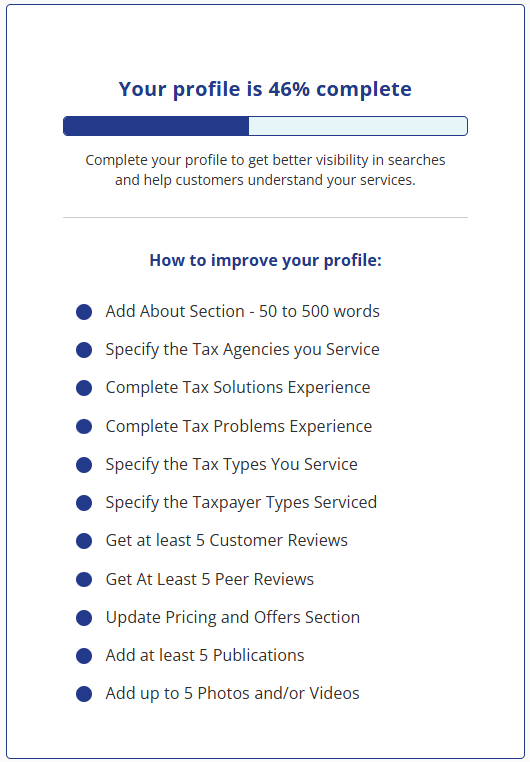
The profile percentage meter tracks your completion progress and highlights what needs improvement.
- Found on your dashboard when logged into TaxCure
- The profile percentage meter is shown in blue. As you complete items, they will be removed from the list. Some may stay longer, like customer and peer reviews, since you can continuously add to them. While the system suggests obtaining at least 5 customer reviews, adding more reviews provides significant benefits, so don't stop there!
- Each section you fill out increases your profile percentage
- Once you hit 70%+, your profile becomes visible in search results
- Below 70%? Your profile will not appear in search results until it meets the minimum threshold.
- Once you exceed 70%, Google will index your profile, helping with branded search rankings.
- TaxCure prioritizes completed profiles to ensure the best user experience for taxpayers.
About Section
Why This Matters
The About section is your introduction to potential clients. It should clearly highlight your experience, qualifications, and most importantly, how you can help clients resolve their tax issues.
Requirements & Best Practices
- Must be between 50 and 500 words
- No links, phone numbers, or AI-generated content
- Should be 100% unique (do not copy from your website or other profiles)
What to Include
✅ Your background (years of experience, credentials, and key achievements)
✅ Types of tax problems you help with (IRS, state, personal, business tax resolution)
✅ Your approach to tax resolution (how you work with clients to solve issues)
✅ Call to action (e.g., "If you need tax relief solutions, I can help.")
📌 Example:
As an Enrolled Agent with over 10 years of experience, I specialize in helping individuals and businesses resolve IRS and state tax problems. I have successfully negotiated installment agreements, offers in compromise, and tax penalty abatements. My goal is to provide personalized tax solutions to help clients regain financial stability. If you are struggling with tax debt, I can help find the right resolution for you.
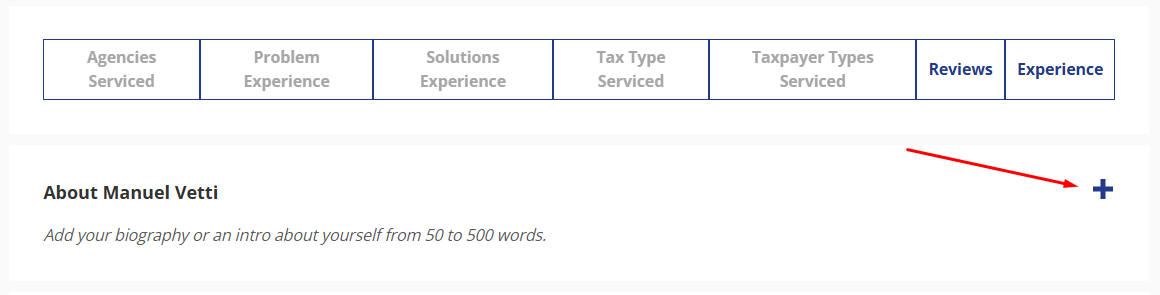
To Edit this section, simply click the + button as seen below:
Adding Tax Agencies, Problems & Solutions
Why This Matters
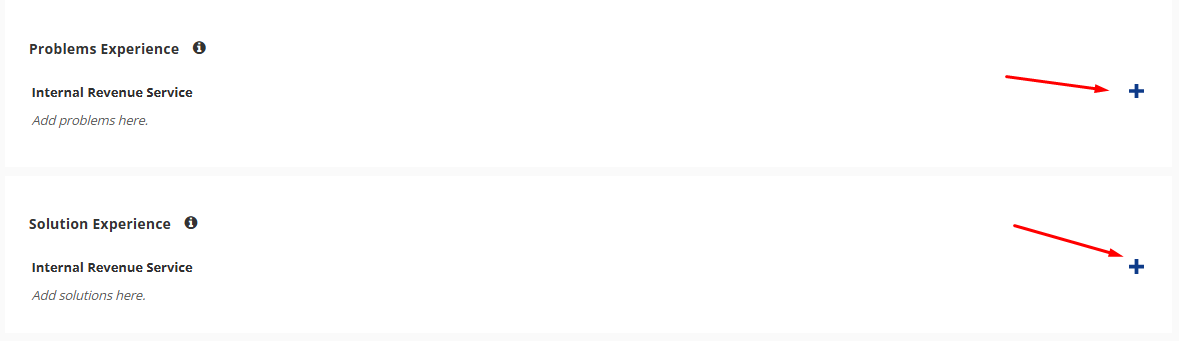
Selecting the right tax agencies, problems, and solutions ensures you show up in the correct searches when taxpayers are looking for help. Adding tax agencies first is required, as the problems and solutions sections related to the agencies you select will populate after you select the agencies.
How to Add Tax Agencies
- Click "Edit Profile" from your dashboard
- Scroll to the Tax Agencies Servicced section
- Click “+ in this section” and select the IRS and/or state tax agencies you work with
- You can select as a basic member up to 5 tax agencies, including the IRS
- Click Save

Adding Tax Problems & Solutions
- After adding an agency, select the tax problems you have experience with each agency you selected
- Then select the solutions you provide for each agency you have selected
- Click Save
📌 Watch this video tutorial: How to Add Tax Agencies, Problems & Solutions
Adding Tax Types & Taxpayer Types
Why This Matters
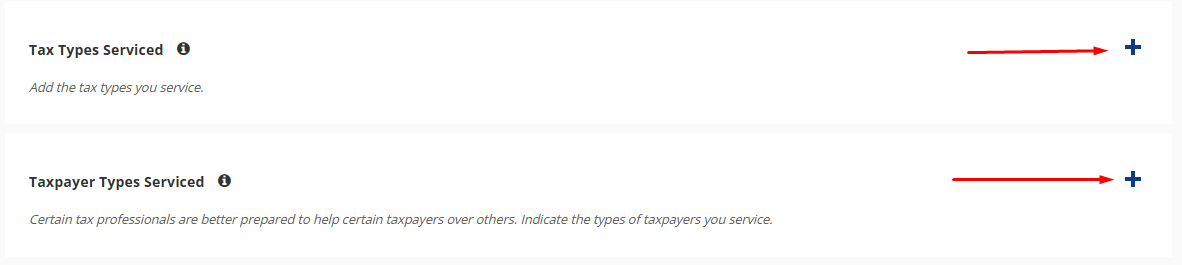
This section helps specify the types of taxpayers you assist and the tax matters you handle.
How to Add Tax Types & Taxpayer Types
- Go to the "Tax Types" section in your profile settings
- Select all the tax types you have experience with (e.g., individual tax, business tax, payroll tax)
- Next, choose the taxpayer types you work with (e.g., individuals, businesses, self-employed)
- Click Save
📌 Watch this video tutorial: Adding Tax Types & Taxpayer Types
Professional Licenses & Designations
Why This Matters
Your professional licenses and designations add credibility and showcase your qualifications to potential clients.
How to Add Your Licenses & Designations
- Your primary professional license (EA, CPA, or Attorney) is automatically listed based on your registration.
- If you have additional licenses or certifications, you can manually add them.
- In this section, you can also include designations such as:
- CTRS (Certified Tax Resolution Specialist)
- NTPI Fellow (National Tax Practice Institute Fellow)
- USTCP (United States Tax Court Practitioner)
- CTRC (Certified Tax Representation Consultant)
- And more!
- If a designation is missing but is relevant to tax resolution, email admin@taxcure.com, and we will add it.

Related Work Experience
Why This Matters
Your work experience section allows you to showcase your professional background, adding credibility to your profile.
How to Add Your Work Experience
- Go to the "Related Work Experience" section in your profile settings.
- Click the “+” icon to add a new position.
- Enter the following details:
- Job Title (e.g., Enrolled Agent, Tax Attorney, CPA)
- Company Name
- Location (City, State)
- Work Duration (Start Date – End Date)
- If you are currently at this position, check the box to set it as "Present."
- If you want this job title to appear in your profile summary (e.g., "EA at Trusted Tax Relief Company"), check the box that says "Show in Profile Summary."
- Click Save to update your profile.

Education Section
Why This Matters
Adding your education helps establish credibility and showcases your background in tax law, accounting, or finance.
How to Add Your Education
- Go to the "Education" section in your profile settings.
- Click the “+” icon to add your prior education.
- Enter your school name, degree, and field of study.
- Click Save to update your profile.
Associations & Memberships
Why This Matters
Adding your professional associations and memberships helps build trust and credibility with potential clients.
How to Add Your Associations & Memberships
- Go to the "Associations & Memberships" section in your profile settings.
- Click the “+” icon to add relevant memberships.
- Enter the association name (e.g., National Association of Enrolled Agents, American Bar Association, ASTPS, etc.).
- Click Save to update your profile.
Updating Contact Information
Why This Matters
Your contact information determines how taxpayers and TaxCure communicate with you. A complete and accurate contact section ensures proper lead generation and notifications.
How to Update Contact Information
- Go to the "Contact Information" section in your profile settings.
- Define your address:
- This is important because it helps TaxCure determine your visibility in search results.
- You can enter a full address or just a city if you prefer privacy (exact street address is optional).
- Enter your phone number:
- This is the number that will be displayed only if you upgrade to TaxCure Pro.
- Taxpayers will use this number to contact you directly.
- Add website, social links, and booking link:
- These fields are available but will only be visible to taxpayers if you upgrade to TaxCure Pro.
- Set your preferences:
- Indicate whether you accept office visits.
- Enter your email for notifications:
- This is the email where you will receive important updates, including:
- Messages sent by taxpayers
- Reviews approved
- Other profile-related actions
- If you upgrade to TaxCure Pro, you will also receive:
- Phone call click notifications
- Website click notifications
- Additional insights on profile engagement
Pricing, Offers & Payment Methods
Why This Matters
Defining your pricing structure and payment methods helps potential clients understand how you operate and what payment options are available to them.
How to Add Your Pricing, Offers & Payment Methods
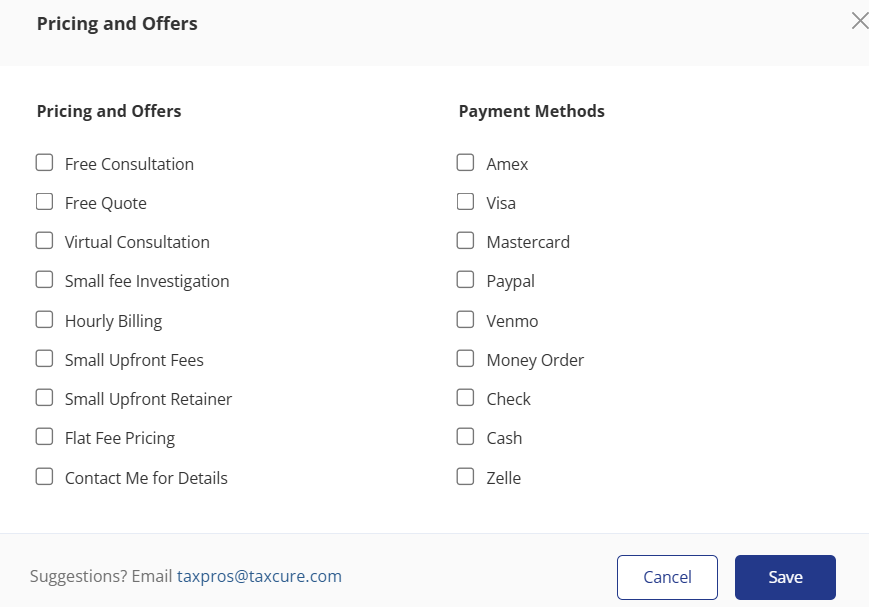
- Go to the "Pricing & Offers" section in your profile settings.
- Select the pricing methods that apply to your services, such as:
- Free Consultation
- Free Quote
- Virtual Consultation
- Small Fee Investigation
- Hourly Billing
- Small Upfront Fees
- Small Upfront Retainer
- Flat Fee Pricing
- Contact Me for Details
- Select your accepted payment methods, including:
- Amex, Visa, Mastercard
- PayPal, Venmo, Zelle
- Money Order, Check, Cash
- Click Save to update your profile.
Publications
Why This Matters
Listing publications and speaking engagements helps establish your authority and credibility in the tax industry.
How to Add Your Publications
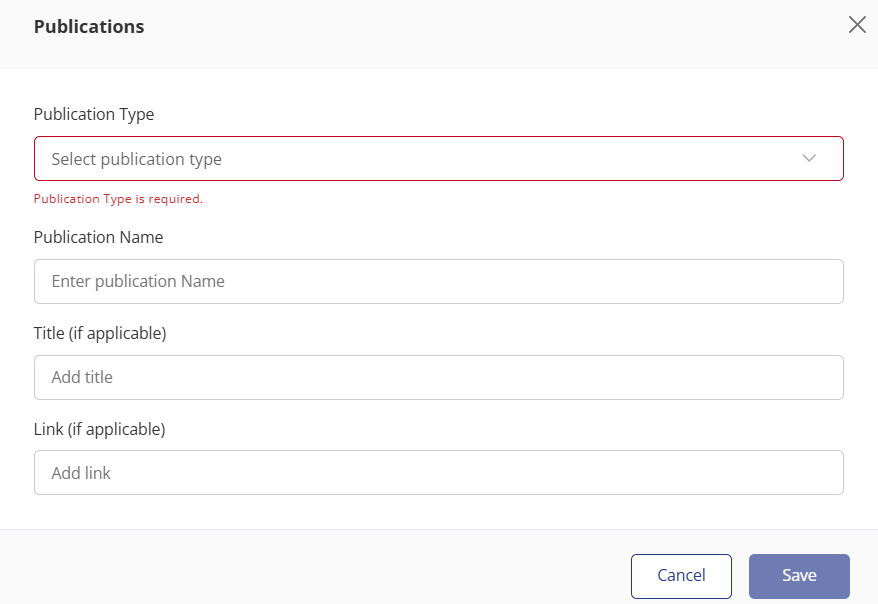
- Go to the "Publications" section in your profile settings.
- Click the “+” icon to add a new publication.
- Enter the following details:
- Publication Type (Book, Web Article, Blog Post, Magazine, Journal, Podcast, Speaking Engagement, etc.)
- Publication Name (e.g., Forbes, Wall Street Journal, Accounting Today)
- Title of the publication
- Link to the publication (if available)
- Click Save to update your profile.
Videos & Photos
Why This Matters
Adding videos and photos helps personalize your profile and make a stronger impression on potential clients.
How to Add Your Videos & Photos
- Go to the "Videos & Photos" section in your profile settings.
- Click the “+” icon to upload media.
- You can upload up to 5 combined videos and photos.
- Recommended uploads include:
- Photos of your team, office, or any professional branding materials.
- Videos introducing your services, explaining tax resolution strategies, or showcasing client testimonials.
- Embedded YouTube videos related to your tax business.
- Click Save to update your profile.
📌 Supported Video Formats: .mp4, .avi, .mov (suggested, include youtube embed)
📌 Supported Image Formats: .png, .jpg, .jpeg, .gif, .webp
📌 Max File Size: 300MB
📌 Need Help? If you need assistance editing a photo or video, or have trouble uploading, email taxpros@taxcure.com.
Setting Up Your Company Profile (If Applicable)
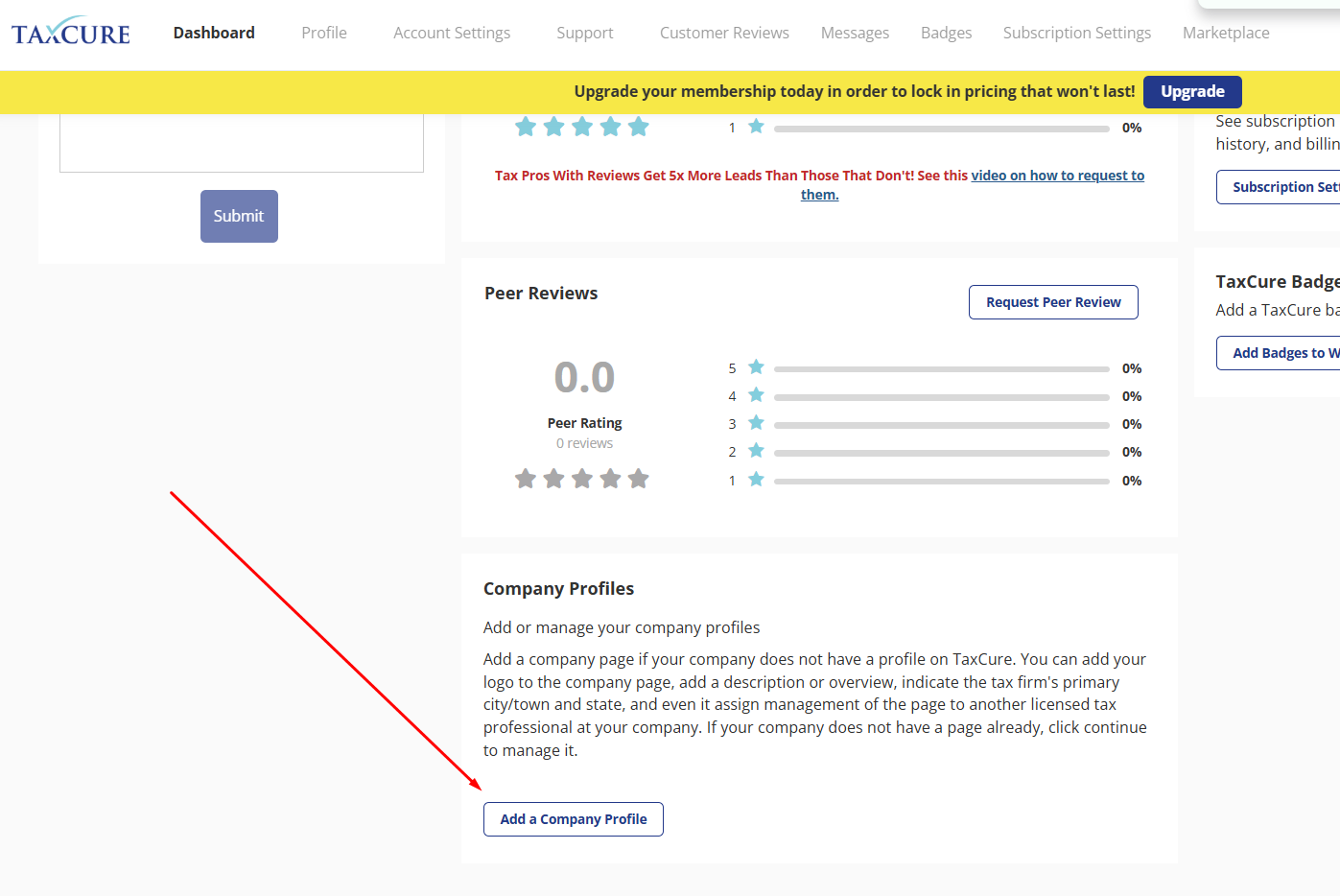
If you have a tax firm, creating a company profile increases your credibility and visibility.
📌 Watch this tutorial: How to Create a Company Profile Page
Requesting Reviews (Client & Peer)
Reviews help establish trust and increase profile visibility.
How to Request Client Reviews
- Go to your profile dashboard
- Click “Request Review”
- Send the link to past clients
📌 Watch this tutorial: How to Request Client Reviews
How to Request Peer Reviews
- Go to your profile dashboard
- Click “Request Peer Review”
- Send requests to colleagues
📌 Watch this tutorial: How to Request Peer Reviews

This request will send the email from the TaxCure platform. Be sure to have the carbon copy option selected, as this request may go into spam for them. We suggest that you then forward it to them and let them know that you send this request and their feedback would be much appreciated.
Final Steps: Profile Completion
Once all sections are complete: ✅ Ensure your profile percentage is above 70%
✅ Your profile will now appear in TaxCure search results
✅ Google will index your page, helping with branded search rankings
🎯 Next Steps:
- Start requesting reviews to further boost your profile
- Check out other tutorials to improve your visibility
- Want to maximize your presence? Stay tuned for more optimization tips!
By following this guide, your TaxCure profile will be fully optimized and ready to attract new clients. Need help? Reach out to support for assistance!