How the Click to Call Works & How to Update Phone Number
Click to Call Video Tutorial
What to Know About Call Button
Did you know that when prospects are given the option between calling and filling out an online lead form, they are far more likely to call? Calls generally have a higher close rate than data leads as well.
With the Tax Pro membership, you now have a call button that is live on your profile as well as in the search results. The call button will increase the number of prospects that reach out to you. The call button also helps your profile stand out since it is an extra bright button on your profile to differentiate your profile from other profiles.
How to Edit the Call Now Number
You likely already have a phone number that is associated with your call button that was inputted when you initially set up your profile. You can edit this phone number or check to make sure you have the number going to the best place by following the steps below. Make sure this phone number is a number that someone will answer to increase your chances of getting the deal.
Step 1: Login to your account and click "edit" on your profile from the account dashboard.
Step 2: Scroll all the way down to the contact information section of your profile. When you hover over that section, you will see the pen icon appear, and clicking the pen will allow you to edit the call button as seen below.
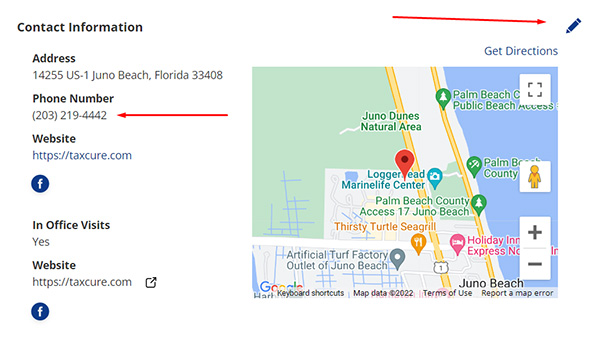
Step 3: Verify, add or modify the phone number that is shown to prospects. Once you are done, click save to have the change updated.
How the Call Button Works & How Analytics Works
For the taxpayer to see your number, they will have to click the call button. The button by default does not show the phone number. The click to reveal your phone number is tracked in analytics. While this isn't an actual phone call that is tracked in analytics, it is still a good measure of engagement of people looking for your phone number.
The call button is displayed in the following areas of the site.
- Search Results
- Top of profile
- Contact information on profile
- Content pages where your profile shows
Accessing Analytics Data on Calls
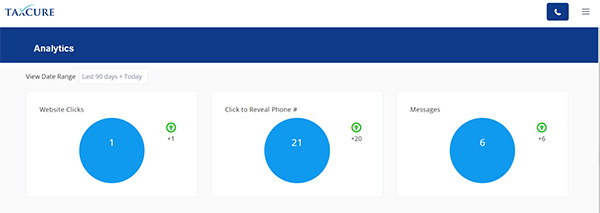
To access your analytics data, click on "Analytics" in the top navigation bar while logged in. This data shows the number of website clicks, click to reveal phone number, and messages as seen below.
Other Tips to Consider
With TaxCure receiving visitors from mobile and desktop users, it isn't possible to track calls that were generated from desktop users. The main metric we use is click to reveal phone number to track engagement with your phone number. In order to accurately track phone calls generated from your TaxCure profile, you would need to use a unique phone number that you can track on your end. You can use services like CallRail, or Google Voice to do this.