Adding up to 10 Tax Agencies TaxCure Pro Membership
Video Tutorial for Adding up to 10 Tax Agencies
How to Add More Tax Agencies
With your TaxCure pro membership, you can select up to 10 tax agencies vs the original 5. This will increase your visibility across the site on various searches and display on more content pages.
Step 1: Login to your account
Step 2: Select edit profile from the professional dashboard
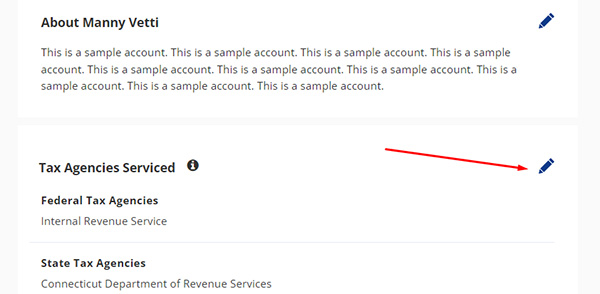
Step 3: Scroll down to Tax Agencies serviced – When you hover over the tax agencies serviced, you will see a pen icon, click on this and it will bring up the tax agencies, as seen in the image below.
Step 4: Add in the additional agencies – You can scroll to find the agencies or you can search to find the tax agencies you are looking for. Once you have all of the agencies added in of your choosing, click save. Once saved, the problems and solutions selections will populate further down on the page that must be completed.
Step 5: Scroll down to the problems experience – A new problems experience section will populate for each new agency you have selected, they will be located under the prior agencies you have selected. Click the plus icon next to each of the new problems sections and add in the tax problems that you have experience with for each agency.

Step 6: Scroll down to the solutions experience – A new solutions experience section will populate for each new agency you have selected. Click the plus icon next to each of the new solutions' sections and add in the tax solutions that you have experience with for each agency.

If there are additional problems or solutions you would like added, you can suggest them in the edit window when adding in problems and solutions. The admin will review each addition and it will be automatically added to your profile once approved.
How Adding Agencies/Problems/Solutions Works
Taxcure uses search technology to consider your profile to be shown in various searches. In order the be considered to be shown for searches related to a particular agency, you must first identify that you have experience with that agency by selecting it on your profile. Users also search by their various problems or solutions that they are interested in, so in order to be shown for those searches, you must have selected those items to be considered. TaxCure also has a variety of content pages that show up in web search results, when a user views the page it will show professionals related to the content on the page. If you have selected problems or solutions related to that topic, your profile will be considered to be shown on that page. Being a pro member, your profile gets priority over non pro members on these pages.